Edit video by asking Claude Code or Codex
Install one plugin and your agent can work in Onano Studio, a free video editor for Windows. Ask for shorts, captions, motion graphics and music. Every edit lands on a real timeline you can still change by hand, and your footage never leaves your computer.
Set up in two minutes
Two lines in your agent, and Studio open on your PC. Claude Code also needs Node.js.
Add the plugin
/plugin marketplace add onanostudio/onano-plugins
/plugin install onano-studio@onano
Then restart your agent and keep Studio open. The plugin is open source: onanostudio/onano-plugins.
Install Onano Studio
Download the free editor for Windows and open it once. The plugin talks to it on your own computer.
Add the plugin
Paste the two lines into Claude Code or Codex. In the Codex app, find Onano Studio under Plugins instead.
Ask for an edit
Restart your agent, keep Studio open, and say what you want. You watch it happen on the timeline.

A real edit
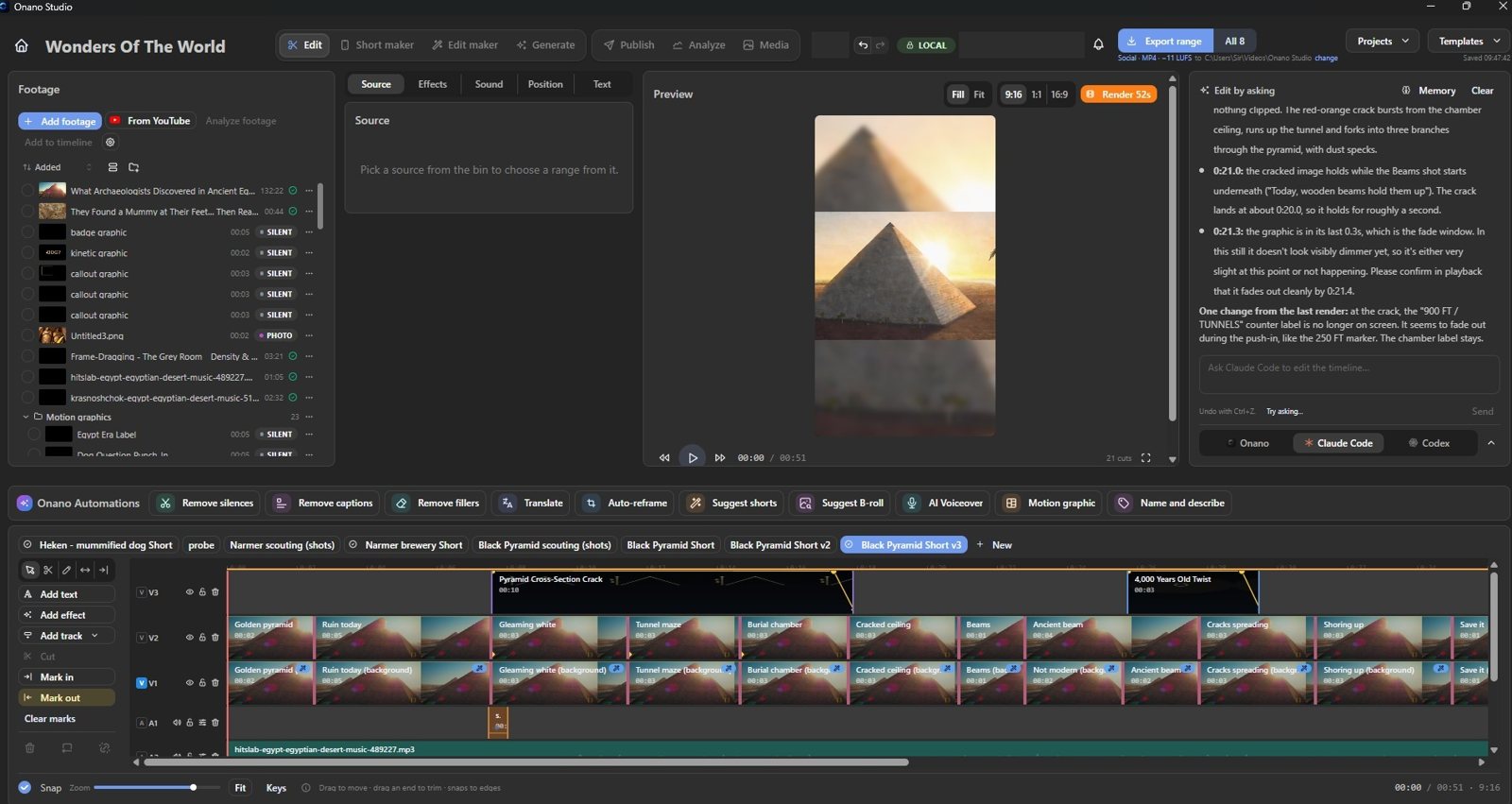
A 2-hour documentary. One line. A 45-second Short.
No timestamps and no hints: Claude Code read the whole film in Onano Studio, found the story, wrote and voiced it, cut the footage to the words, and finished it with captions, music and motion graphics.
THE WHOLE PROMPT
Choose the story with the greatest potential to hold a general audience until the end. Do not ask me for timestamps.
17 shots, reframed to 9:16
7 voiceover lines
Captions in the Short’s look
Music and sound effects
Animated graphics over the shots
Then notes, like you’d give an editor: open on the most amazing part, put a twist halfway, give the answer last. The new cut was on the timeline seven minutes later.
Things to ask for
Plain words, the way you would brief an editor.
> Turn my latest recording into three shorts with captions.
> Take out the pauses and the ums.
> Make a title card motion graphic for the start.
> Reframe this for TikTok and keep my face in shot.
> Cut the B-roll in my footage folder to the beat of this song.
> Translate the captions into Spanish.
What your agent can do in Studio
Shorts from long recordings
It reads the transcript, picks the moments worth posting, cuts them and reframes them to 9:16 with the speaker in shot.
Captions in your look
Timed from the transcript, in the colours and size you want. Misheard words are fixed on the timeline, not in a text file.
Motion graphics for the moment
Titles, numbers, lists and lower thirds, animated and placed over the shot they belong to.
Sound and music
Pauses and filler words out, voices evened out, sound effects added and footage cut to the beat.
It looks before it says done
Your agent renders frames of the edit and checks them, the way you would scrub through before exporting.
Export and publish
It exports and opens Publish for YouTube, TikTok and Instagram. You press the button.
MCP server
A video editing MCP server for Claude Code and Codex
If you searched for Claude Code video editing, a Codex video editor, or an MCP server for video editing, this is it. The plugin starts the MCP server that ships inside Onano Studio, so Claude Code, the Codex CLI and the Codex app can open your projects, cut, caption, add motion graphics and export through more than 70 editing tools, all on your own Windows PC.
onano_transcribe
onano_segments
onano_new_sequence
onano_cut
onano_trim_clip
onano_split_at
onano_remove_fillers
onano_silences
onano_auto_frame
onano_steady_clip
onano_add_captions
onano_set_caption_style
onano_translate_captions
onano_design_motion_graphic
onano_add_text
onano_add_transition
onano_apply_grade
onano_add_sound
onano_cut_to_beats
onano_level_voices
onano_add_voiceover
onano_find_footage
onano_look_at_frame
onano_export_sequence
onano_write_post
onano_open_publish
onano_undo
and more…
Why edit this way
Your own plan does the thinking
The reasoning runs on the Claude or ChatGPT subscription you already pay for, not on credits bought from an editor.
Your footage stays on your PC
Transcription, picture analysis and rendering run locally. Nothing is uploaded to edit it.
A real timeline, not a black box
Every cut, caption and graphic is a normal clip you can move, trim or undo by hand, in the same project.
It asks before it spends or posts
Anything that uses Onano credits or publishes to your accounts is checked with you first.
Questions
Anything else? Write to info@onano.app.
Is it free?
Yes. Onano Studio and the plugin are free, and editing on your computer costs nothing. A few features run through Onano’s server, such as translation, voiceover, and titles and descriptions. They use your Onano plan’s credits, and the agent asks before using them.
Is my video uploaded?
No. Transcription, picture analysis and rendering run on your PC. Only text goes to Onano’s server for the features above, and your video only leaves when you publish it.
Which agents work with it?
Claude Code (it needs Node.js installed) and Codex, both the CLI and the Codex app.
Can Claude Code edit videos?
With this plugin, yes. Claude Code has no video tools of its own; the plugin connects it to Onano Studio over MCP, and Studio does the transcribing, cutting and rendering on your PC.
Is Onano an MCP server?
Yes. Onano Studio includes an MCP server for video editing. The plugin is the one-step way to connect it; any MCP client that runs local servers can use it too.
Does it work on a Mac?
Not yet. Onano Studio is Windows 10 and 11 only for now.
I already connected Claude Code from inside Studio. Do I need this too?
No. Settings → Connect Claude Code in Studio and this plugin do the same thing; either one is enough. The plugin also teaches your agent how to edit well in Studio.
Give your agent an editor
Onano Studio is free. Install it, add the plugin, and ask for your first edit.
Get Onano Studio — free